# Méthodes
# DHCP - Rogue DHCP
### Historique
<Intemporel>
---
### Description
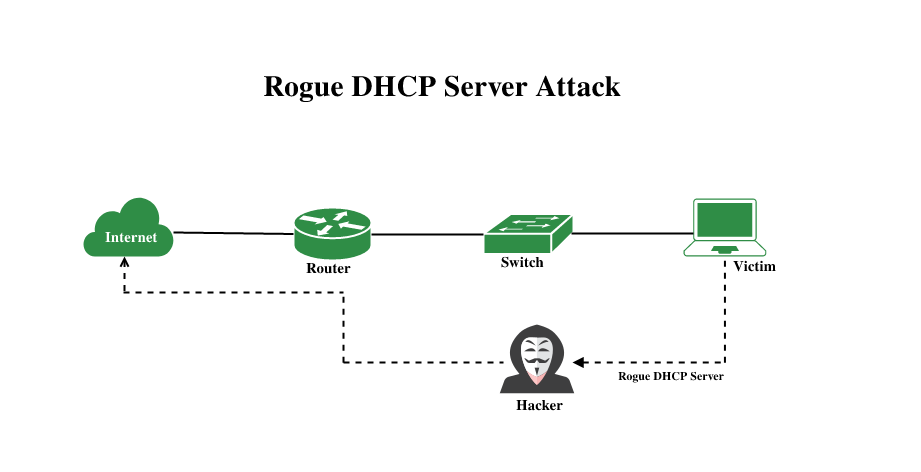
Rogue DHCP server attacks are gaining popularity but can be mitigated. The hacker sets up a rogue DHCP server and creates an IP address conflict by broadcasting a duplicate IP address. Hackers infiltrate a network by attacking the wireless router, which they do with ARP poisoning in order to inject rogue packets into the stream of data being processed by the router. This ingenious hack gives hackers continuous access to networks via proxy servers and spam mailers, making it difficult for IT professionals to stop or even detect a cyber attack from happening. The hacker then listens for incoming connections and selectively responds with malicious messages such as fake authentication requests or viruses that play havoc on unsuspecting users’ devices.
### **Rogue DHCP Server Attack:**
The hacker sets up a rogue [DHCP](https://www.geeksforgeeks.org/computer-networks/dynamic-host-configuration-protocol-dhcp/) server and creates an [IP address ](https://www.geeksforgeeks.org/computer-science-fundamentals/what-is-an-ip-address/)conflict by broadcasting a duplicate IP address. Hackers infiltrate a network by attacking the wireless router, which they do with ARP poisoning in order to inject rogue packets into the stream of data being processed by the router. This ingenious hack gives hackers continuous access to networks via proxy servers and spam mailers, making it difficult for IT professionals to stop or even detect a cyber attack from happening. The hacker then listens for incoming connections and selectively responds with malicious messages such as fake authentication requests or viruses that play havoc on unsuspecting users’ devices.
Rogue DHCP server attacks are gaining popularity but can be mitigated. The hacker sets up a rogue DHCP server and creates an IP address conflict by broadcasting a duplicate IP address. The hacker will then try to get computers to connect to the rogue device instead of the router. Once that’s accomplished, the hacker can do just about anything he wants, ranging from stealing information to installing malicious software on your computer in order to control it remotely. A government official speaking at a recent press conference said that Iran had set up fake wireless networks in countries like Iraq and Afghanistan, so they could monitor communications easily while people were using [Wi-Fi ](https://www.geeksforgeeks.org/computer-networks/what-is-wi-fiwireless-fidelity/)hotspots.
---
### Schéma
[](https://docs.labs404.fr/uploads/images/gallery/2026-09/PqYimage.png)
---
### Prevention:
- Always use trusted WLAN hotspots.
- Enable [MAC filtering](https://www.geeksforgeeks.org/computer-networks/mac-filtering-in-computer-network/)/SSID broadcast on your wireless network as much as possible. This will help prevent your network from being accessed by unwanted users.
- Update the firmware and applications whenever a security update is available for them (especially firmware). This will close loopholes and patch vulnerabilities in your wireless network that hackers can exploit to gain access to your devices or the corporate network behind them.
- Turn off file sharing (CIFS/SMB) on your wireless bridges, routers, etc.
- Log and monitor all ingress/egress traffic.
- Log all DHCP lease events on your wireless network.
- If the rogue DHCP server is accessed from inside the network, then restrict the IP addresses that have access to your DHCP server and/or reset the [MAC address](https://www.geeksforgeeks.org/computer-networks/mac-address-in-computer-network/) on your router/[firewall](https://www.geeksforgeeks.org/computer-networks/introduction-of-firewall-in-computer-network/), so it only accepts packets from that specific MAC address as an authorized device that is allowed to connect to your network (stateful packet inspection).
- Change default passwords (always choose a complex password) for your wireless equipment such as routers, access points, etc.
- Enable Secure NAT on the Router or Firewall in order to prevent unwanted users from accessing internal servers behind it
### **Important points:**
- The hacker will first use an attack on the wireless router with MAC address spoofing and ARP poisoning.
- The hacker will then try to get computers to connect to the rogue device instead of the router. Once that’s accomplished, the hacker can do just about anything, ranging from stealing information to installing malicious software on your computer in order to control it remotely. This can include:
-Stealing data -Downloading/Uploading viruses -Spyware -Hacking into your computer -Conducting man-in-the-middle attacks against you.
- Hackers use fake websites (often phishing) in order to get users to log in to their accounts illegally with their social security numbers and passwords.
### **Conclusion:**
Rogue DHCP server attacks can result in a great deal of damage to your network and the organization. Whether it’s sensitive data or just unwanted visitors, you need to take this seriously and make sure you have secure access control strategies in place.
---
### Sources
[What is Rogue DHCP Server Attack? - GeeksforGeeks](https://www.geeksforgeeks.org/ethical-hacking/what-is-rogue-dhcp-server-attack/)
# DHCP - DHCP Starvation
### Historique
<intemporel>
---
### Description
DHCP (Dynamic Host Configuration Protocol) is used to assign IP addresses to machines within any network automatically. It is also known as zeroconf protocol, as network administrators don't need to assign IP addresses to machines manually. To assign IP addresses, [DHCP](https://www.geeksforgeeks.org/computer-networks/dynamic-host-configuration-protocol-dhcp/) makes use of DORA packets which stands for Discover message, offer message, Request message, and acknowledgment message respectively.
This article describes the DHCP Starvation Attack and how it can be implemented.
### DHCP Starvation Attack:
A DHCP Starvation attack can result in a [Denial of Service (DoS) attack](https://www.geeksforgeeks.org/computer-networks/denial-of-service-ddos-attack/) or a [Man in the Middle (MITM) attack](https://www.geeksforgeeks.org/computer-networks/mitm-man-in-the-middle-attack-using-arp-poisoning/). To perform this attack, the attacker sends tons of bogus DHCP Discover messages with spoofed source MAC addresses. The DHCP server tries to respond to all these bogus messages, and as a result, the pool of IP addresses used by the DHCP server is depleted. Hence, a legitimate user won't be able to get an IP address via DHCP. This results in a DoS attack. Furthermore, the attacker can set up a rogue DHCP server to assign IP addresses to legitimate users. This rogue server can also provide the gateway router and DNS server to users. Now, all the network traffic can be routed via the attacker's machine, and this is nothing but the MITM attack.
The IP address of the DHCP server is 10.10.10.1/24 with a subnet mask of 255.255.255.0. So, the DHCP server can hand out 254 unique IP addresses. However, some IP addresses are reserved for static routing, so it could be less than 254. The attacker sends N DHCP Discover packets, where N is very large compared to 254. Hence, the DHCP server can no longer hand out IP addresses.
---
### Schéma
### Preventing DHCP Starvation Attack:
DHCP Starvation attack can be prevented by implementing port security, refer to [Port Security in Computer Network](https://www.geeksforgeeks.org/computer-networks/port-security-in-computer-network/) to know more. Port security can be configured in a switch. With port security, you can limit the number of MAC addresses learned by the port. Hence, the switch would forward packets with known [MAC addresses](https://www.geeksforgeeks.org/computer-networks/mac-address-in-computer-network/), and discard others. This would prevent bogus packets from reaching the DHCP server.
### Implementation using Yersinia:
Yersinia is a tool for performing layer 2 attacks. It takes advantage of weaknesses in existing protocols to launch a variety of attacks.
**Step 1:** You can install Yersinia on Ubuntu 20.04 using the following command:
```
sudo apt-get install yersinia
```
**Step 2:** Run the following command to open Yersinia in GUI mode -
```
sudo yersinia -G
```
The image below shows default settings for DHCP in Yersinia
The source IP address is set to 0.0.0.0 as new users send packets using this IP address before they are assigned an IP address by the DHCP server and the destination IP address is set to 255.255.255.255 as the DHCP discover packet is broadcasted in the entire network.
**Step 3:** Next, we need to select the appropriate interface. For simulation purposes, lo that is the loopback interface was selected. This setting will send DHCP to discover packets to the loopback address. In short, localhost is the DHCP server in this case.
**Step 4:** Next, we need to select the type of attack that is “sending Discover packet”. You can observe that the DoS checkbox next to it is checked since it is a type of DoS.
**Step 5:** After launching the attack, many DHCP Discover packets were captured using Wireshark on the loopback interface. We can see one of the packets in the image below. You can get an idea of the number of packets sent by looking at the frame number. We can also see the made-up source MAC address. All these packets have different source MAC addresses.

---
### Sources
[DHCP Starvation Attack - GeeksforGeeks](https://www.geeksforgeeks.org/ethical-hacking/dhcp-starvation-attack/)