# Active Directory - Security Hardening

<table id="bkmrk-difficult%C3%A9%2A-%3Cdescrip" style="border-collapse: collapse; width: 100%; height: 46.8px; border-width: 1px; border-style: hidden;"><colgroup><col style="width: 20%;"></col><col style="width: 80%;"></col></colgroup><tbody><tr style="height: 46.8px;"><td style="height: 46.8px; border: 1px groove rgb(52,73,94);">[![image.png](https://docs.labs404.fr/uploads/images/gallery/2026-07/scaled-1680-/bsnintermediaire-png.png)](https://docs.labs404.fr/uploads/images/gallery/2026-07/scaled-1680-/bsnintermediaire-png.png)  
</td><td style="height: 46.8px; border-width: 1px; background-color: rgb(236,202,250); vertical-align: top;">Difficulté : Intermédiaire

Notions : Active directory, GPO, Sécurité

</td></tr></tbody></table>

---

### <span style="color: rgb(52,73,94);">**<span style="text-decoration: underline;">I. Introduction</span>**</span>

<p class="callout info">**Note** : Pour réaliser l'audit, c'est PingCastle qui sera utilisé. Il est téléchargeable [Ici](https://www.pingcastle.com/download/)</p>

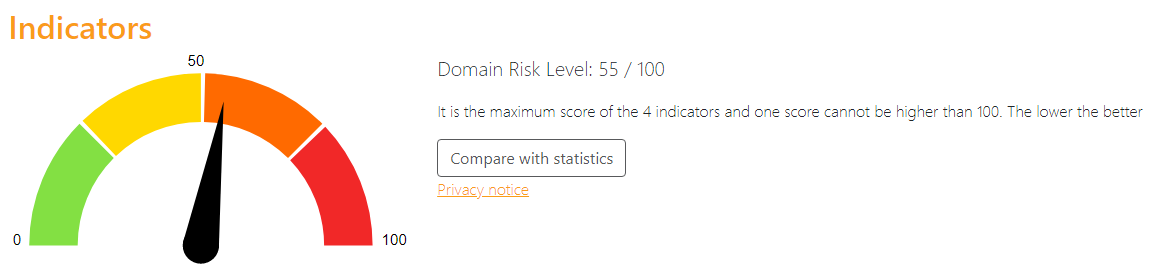
[![image.png](https://docs.labs404.fr/uploads/images/gallery/2026-07/scaled-1680-/jzXimage-png.png)](https://docs.labs404.fr/uploads/images/gallery/2026-07/scaled-1680-/jzXimage-png.png)

Comme vu dans le rapport d'audit de sécurité, par défaut un Active Directory est moyennement vulnérable et certaines fonctionnalités risquent de ne pas être actives ou mal paramétrées. Il est donc bon de revoir certaines choses avant de réellement passer en production.

<p class="callout success">**Astuce** : Le focus sera ici fait sur tous les points permettant de passer le score de risque à 0. Un certains nombres de points sont présents dans le rapport d'audit à titre informatif et peuvent également être corrigés.</p>

---

### <span style="color: rgb(52,73,94);">**<span style="text-decoration: underline;">II. Modifier la stratégie de sécurité par défaut</span>**</span>

Lancer l’éditeur de GPO :

[![image.png](https://docs.labs404.fr/uploads/images/gallery/2026-07/scaled-1680-/gAtimage-png.png)](https://docs.labs404.fr/uploads/images/gallery/2026-07/scaled-1680-/gAtimage-png.png)

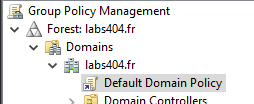
Trouver la GPO '<span style="color: rgb(132,63,161);">***Default Domain Policy***</span>'

[![image.png](https://docs.labs404.fr/uploads/images/gallery/2026-07/scaled-1680-/7Whimage-png.png)](https://docs.labs404.fr/uploads/images/gallery/2026-07/scaled-1680-/7Whimage-png.png)

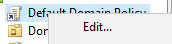
faire '<span style="color: rgb(132,63,161);">***Clic droit --&gt; Edit***</span>'

[![image.png](https://docs.labs404.fr/uploads/images/gallery/2026-07/scaled-1680-/bn5image-png.png)](https://docs.labs404.fr/uploads/images/gallery/2026-07/scaled-1680-/bn5image-png.png)

#### <span style="color: rgb(35,111,161);">***2.1 Changer la politique des mots de passe***</span>

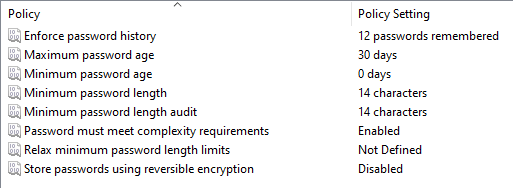
Dans la section '<span style="color: rgb(132,63,161);">***Computer Configuration / Policies / Windows Settings / Security settings / Account Policies / Password Policy***</span>'

<table id="bkmrk-password-history-%3A-m" style="border-collapse: collapse; width: 100%;"><colgroup><col style="width: 50%;"></col><col style="width: 50%;"></col></colgroup><tbody><tr><td class="align-center" style="border-style: hidden; vertical-align: middle;">- Password History : minimum 12
- Maximum password age : 30 jours
- Minimum password age : 0 jours
- Minimum password lenght : 14 caractères
- Minimum password lenght Audit : 14 caractères
- Must meet complexity requirements : Enabled

</td><td class="align-center" style="border-style: hidden; vertical-align: middle;">[![image.png](https://docs.labs404.fr/uploads/images/gallery/2026-07/scaled-1680-/wIbimage-png.png)](https://docs.labs404.fr/uploads/images/gallery/2026-07/scaled-1680-/wIbimage-png.png)

</td></tr></tbody></table>

#### <span style="color: rgb(35,111,161);">***2.2 Changer la politique de verrouillage des comptes***</span>  


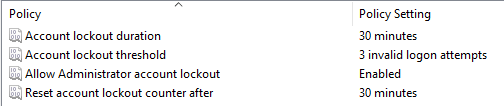
Dans la section '<span style="color: rgb(132,63,161);">***Computer Configuration / Policies / Windows Settings / Security settings / Account Policies / Account Lockout Policy***</span>'

<table id="bkmrk-account-lockout-dura" style="border-collapse: collapse; width: 100%;"><colgroup><col style="width: 50%;"></col><col style="width: 50%;"></col></colgroup><tbody><tr><td class="align-center" style="border-style: hidden; vertical-align: middle;">- Account lockout duration : 30 minutes
- Account lockout threshold : 3 essais
- Allow Administrator Account Lockout : Enabled
- Reset Account Lockout count after : 30 minutes

</td><td class="align-center" style="border-style: hidden; vertical-align: middle;">[![image.png](https://docs.labs404.fr/uploads/images/gallery/2026-07/scaled-1680-/MSqimage-png.png)](https://docs.labs404.fr/uploads/images/gallery/2026-07/scaled-1680-/MSqimage-png.png)

</td></tr></tbody></table>

---

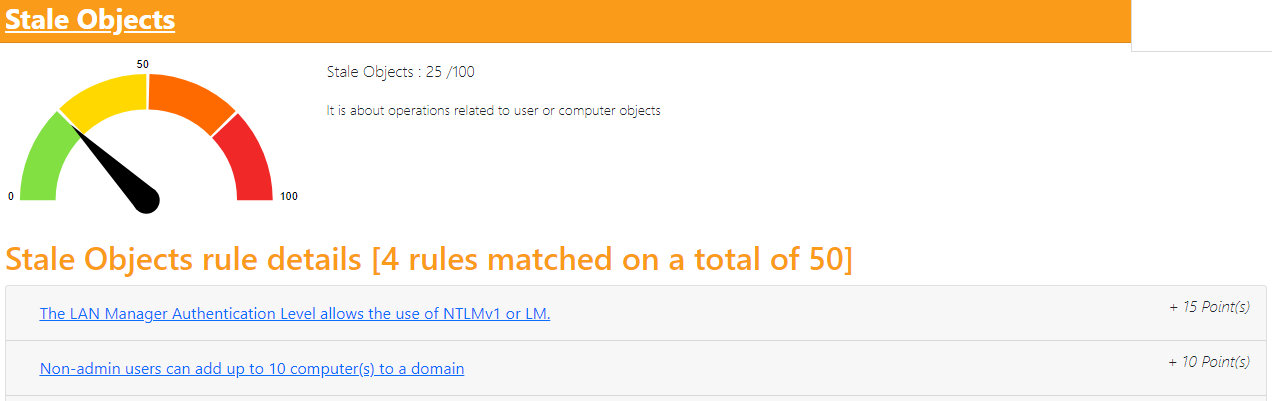
### <span style="text-decoration: underline; color: rgb(52,73,94);">**III. Corriger les 'Stale Objects'**</span>

[![image.png](https://docs.labs404.fr/uploads/images/gallery/2026-07/scaled-1680-/u3himage-png.png)](https://docs.labs404.fr/uploads/images/gallery/2026-07/scaled-1680-/u3himage-png.png)

#### <span style="color: rgb(35,111,161);">***3.1 Désactiver NTLMv1***</span>

<p class="callout warning">**Attention** : Les postes inférieurs à windows 7 ou effectuant leurs connections en NTLMv1 ne pourront plus se connecter sur le domaine.</p>

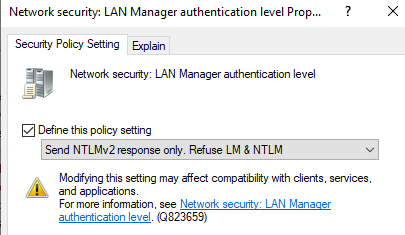
Éditer la '<span style="color: rgb(132,63,161);">***Default Domain Policy***</span>' et modifier le paramètre suivant :

'<span style="color: rgb(132,63,161);">***Settings / Security Settings / Local Policies / Security Options** / **Network Security: LAN Manager authentication level***</span>'

[![image.png](https://docs.labs404.fr/uploads/images/gallery/2026-07/scaled-1680-/z3timage-png.png)](https://docs.labs404.fr/uploads/images/gallery/2026-07/scaled-1680-/z3timage-png.png)

#### <span style="color: rgb(35,111,161);">***3.2 Retirer aux utilisateurs le droits d'ajouter des machines***</span>

<p class="callout info">**Note** : cela n'affectera que les comptes utilisateurs, mais les administrateurs de domaines garderons tout de même ce privilège.</p>

<details id="bkmrk-en-mode-gui-ouvrir-l"><summary>En mode GUI</summary>

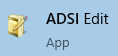
Ouvrir la console '<span style="color: rgb(132,63,161);">***ADSI Edit***</span>'

[![image.png](https://docs.labs404.fr/uploads/images/gallery/2026-07/scaled-1680-/sOJimage-png.png)](https://docs.labs404.fr/uploads/images/gallery/2026-07/scaled-1680-/sOJimage-png.png)

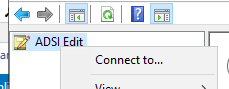
Faire un clic droit puis '<span style="color: rgb(132,63,161);">***Connect To...***</span>'

[![image.png](https://docs.labs404.fr/uploads/images/gallery/2026-07/scaled-1680-/cQbimage-png.png)](https://docs.labs404.fr/uploads/images/gallery/2026-07/scaled-1680-/cQbimage-png.png)

Choisir le contexte par défaut et faire '<span style="color: rgb(132,63,161);">***OK***</span>'.

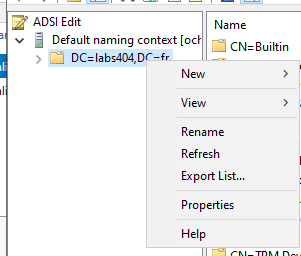
Sélectionner l'objet racine du domaine, puis clic droit --&gt; '<span style="color: rgb(132,63,161);">***Properties***</span>'

[![image.png](https://docs.labs404.fr/uploads/images/gallery/2026-07/scaled-1680-/aA8image-png.png)](https://docs.labs404.fr/uploads/images/gallery/2026-07/scaled-1680-/aA8image-png.png)

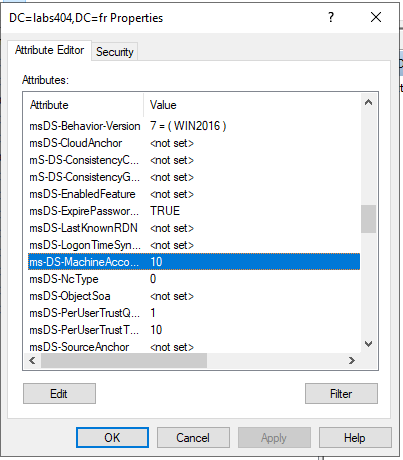
Dans l'editeur d'attributs, trouver l'attribut '<span style="color: rgb(132,63,161);">***ms-DS-MachineAccountQuota***</span>'

[![image.png](https://docs.labs404.fr/uploads/images/gallery/2026-07/scaled-1680-/TdTimage-png.png)](https://docs.labs404.fr/uploads/images/gallery/2026-07/scaled-1680-/TdTimage-png.png)

Fixer sa valeur à '<span style="color: rgb(132,63,161);">0</span>'.

</details><details id="bkmrk-en-mode-console-set-"><summary>En mode console</summary>

```powershell
Set-ADDomain -Identity "DC=<domain>,DC=<ext>" -Replace @{"ms-DS-MachineAccountQuota"="0"}
```

[![image.png](https://docs.labs404.fr/uploads/images/gallery/2026-07/scaled-1680-/63Bimage-png.png)](https://docs.labs404.fr/uploads/images/gallery/2026-07/scaled-1680-/63Bimage-png.png)

</details>---

### <span style="text-decoration: underline; color: rgb(52,73,94);">**IV. Corriger les 'Privileged Accounts'**</span>

[![image.png](https://docs.labs404.fr/uploads/images/gallery/2026-07/scaled-1680-/uGLimage-png.png)](https://docs.labs404.fr/uploads/images/gallery/2026-07/scaled-1680-/uGLimage-png.png)


Les deux points suivants peuvent être corrigés en une fois.

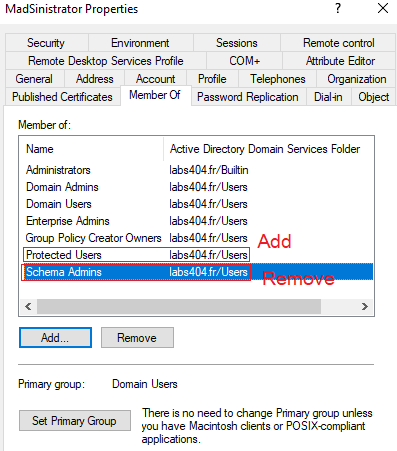
- <span style="color: rgb(132,63,161);">***Ajouter***</span> les comptes à protéger dans le groupe Builtin '<span style="color: rgb(132,63,161);">***Protected Users***</span>'
- <span style="color: rgb(132,63,161);">***Retirer***</span> les comptes admins du groupe '<span style="color: rgb(132,63,161);">***Shema Admins***</span>'

<p class="callout warning">***Attention*** : Sortir l'administrateur du domaine du group administrateur de schéma signifie qu'il faudra l'y ré-ajouter pour toute modification / mise à jour du schéma Active Directory.</p>

<details id="bkmrk-en-mode-gui"><summary>En mode GUI</summary>

[![image.png](https://docs.labs404.fr/uploads/images/gallery/2026-07/scaled-1680-/VwIimage-png.png)](https://docs.labs404.fr/uploads/images/gallery/2026-07/scaled-1680-/VwIimage-png.png)

</details><details id="bkmrk-en-mode-console-remo"><summary>En mode console</summary>

```powershell
Remove-ADGroupMember -Identity "Schema Admins" -Members "<Compte Admin>"
Add-ADGroupMember -Identity "Protected Users" -Members "<Compte Admin>"
```

[![image.png](https://docs.labs404.fr/uploads/images/gallery/2026-07/scaled-1680-/Cwsimage-png.png)](https://docs.labs404.fr/uploads/images/gallery/2026-07/scaled-1680-/Cwsimage-png.png)

</details>Sur l'utilisateur Administrator, Faire un '<span style="color: rgb(132,63,161);">***clic droit --&gt; Properties***</span>', dans l'onglet '<span style="color: rgb(132,63,161);">***Account***</span>', cocher également l'attribut : '<span style="color: rgb(132,63,161);">***Account is sensitive and cannot be delegated***</span>'.

[![image.png](https://docs.labs404.fr/uploads/images/gallery/2026-07/scaled-1680-/TJIimage-png.png)](https://docs.labs404.fr/uploads/images/gallery/2026-07/scaled-1680-/TJIimage-png.png)

---

### <span style="text-decoration: underline; color: rgb(52,73,94);">**V. Corriger les derniers points**</span>

[![image.png](https://docs.labs404.fr/uploads/images/gallery/2026-07/scaled-1680-/q8cimage-png.png)](https://docs.labs404.fr/uploads/images/gallery/2026-07/scaled-1680-/q8cimage-png.png)

#### *<span style="color: rgb(35,111,161);">**5.1 Activer les audits d'évènements**</span>* 

Lancer l’éditeur de GPO :

[![image.png](https://docs.labs404.fr/uploads/images/gallery/2026-07/scaled-1680-/gAtimage-png.png)](https://docs.labs404.fr/uploads/images/gallery/2026-07/scaled-1680-/gAtimage-png.png)

Trouver la GPO '<span style="color: rgb(132,63,161);">***Default Domain Policy***</span>'

[![image.png](https://docs.labs404.fr/uploads/images/gallery/2026-07/scaled-1680-/7Whimage-png.png)](https://docs.labs404.fr/uploads/images/gallery/2026-07/scaled-1680-/7Whimage-png.png)

faire '<span style="color: rgb(132,63,161);">***Clic droit --&gt; Edit***</span>'

[![image.png](https://docs.labs404.fr/uploads/images/gallery/2026-07/scaled-1680-/bn5image-png.png)](https://docs.labs404.fr/uploads/images/gallery/2026-07/scaled-1680-/bn5image-png.png)

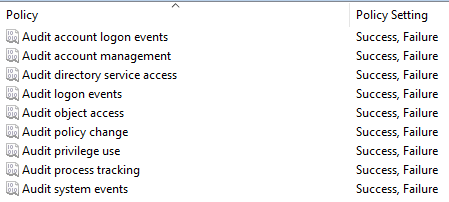
Dans la section '<span style="color: rgb(132,63,161);">***Computer Configuration / Policies / Windows Settings / Security settings / Local Policy / Audit Policy***</span>'

<table id="bkmrk-password-history-%3A-m-1" style="border-collapse: collapse; width: 100%; height: 160.25px;"><colgroup><col style="width: 50%;"></col><col style="width: 50%;"></col></colgroup><tbody><tr style="height: 160.25px;"><td class="align-center" style="border-style: hidden; vertical-align: middle; height: 160.25px;">Tout Passer en 'success &amp; failure'</td><td class="align-center" style="border-style: hidden; vertical-align: middle; height: 160.25px;">[![image.png](https://docs.labs404.fr/uploads/images/gallery/2026-07/scaled-1680-/yzwimage-png.png)](https://docs.labs404.fr/uploads/images/gallery/2026-07/scaled-1680-/yzwimage-png.png)

</td></tr></tbody></table>

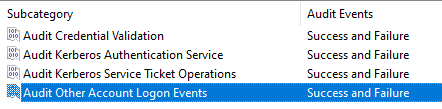
Dans la section '<span style="color: rgb(132,63,161);">***Computer Configuration / Policies / Windows Settings / Security settings / Advanced Audit Policy Configuration / Audit Policy***</span>'

Activer les audits de comptes '<span style="color: rgb(132,63,161);">***Account Logon***</span>':

<table id="bkmrk-tout-passer-en-%27succ" style="border-collapse: collapse; width: 100%; height: 160.25px;"><colgroup><col style="width: 50%;"></col><col style="width: 50%;"></col></colgroup><tbody><tr style="height: 160.25px;"><td class="align-center" style="border-style: hidden; vertical-align: middle; height: 160.25px;">Tout Passer en 'success &amp; failure'</td><td class="align-center" style="border-style: hidden; vertical-align: middle; height: 160.25px;">[![image.png](https://docs.labs404.fr/uploads/images/gallery/2026-07/scaled-1680-/dH6image-png.png)](https://docs.labs404.fr/uploads/images/gallery/2026-07/scaled-1680-/dH6image-png.png)

</td></tr></tbody></table>

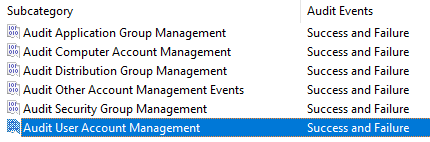
Activer les audits de management des comptes '<span style="color: rgb(132,63,161);">***Account Management***</span>':

<table id="bkmrk-tout-passer-en-%27succ-1" style="border-collapse: collapse; width: 100%; height: 160.25px;"><colgroup><col style="width: 50%;"></col><col style="width: 50%;"></col></colgroup><tbody><tr style="height: 160.25px;"><td class="align-center" style="border-style: hidden; vertical-align: middle; height: 160.25px;">Tout Passer en 'success &amp; failure'</td><td class="align-center" style="border-style: hidden; vertical-align: middle; height: 160.25px;">[![image.png](https://docs.labs404.fr/uploads/images/gallery/2026-07/scaled-1680-/JKvimage-png.png)](https://docs.labs404.fr/uploads/images/gallery/2026-07/scaled-1680-/JKvimage-png.png)

</td></tr></tbody></table>

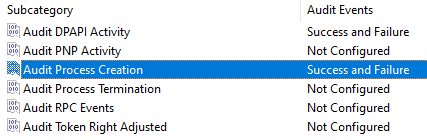
Activer les audits de tracking '<span style="color: rgb(132,63,161);">***Detailed Tracking***</span>':

<table id="bkmrk-tout-passer-en-%27succ-2" style="border-collapse: collapse; width: 100%; height: 160.25px;"><colgroup><col style="width: 50%;"></col><col style="width: 50%;"></col></colgroup><tbody><tr style="height: 160.25px;"><td class="align-center" style="border-style: hidden; vertical-align: middle; height: 160.25px;">A minima :

- Audit DPAPI Activity
- Audite Process Creation

</td><td class="align-center" style="border-style: hidden; vertical-align: middle; height: 160.25px;">[![image.png](https://docs.labs404.fr/uploads/images/gallery/2026-07/scaled-1680-/ZK5image-png.png)](https://docs.labs404.fr/uploads/images/gallery/2026-07/scaled-1680-/ZK5image-png.png)

</td></tr></tbody></table>

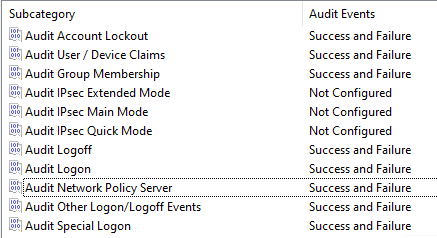
Activer les audits des événements '<span style="color: rgb(132,63,161);">***Logon,Logoff***</span>'':

<table id="bkmrk-tout-passer-en-%27succ-3" style="border-collapse: collapse; width: 100%; height: 160.25px;"><colgroup><col style="width: 50%;"></col><col style="width: 50%;"></col></colgroup><tbody><tr style="height: 160.25px;"><td class="align-center" style="border-style: hidden; vertical-align: middle; height: 160.25px;">Tout Passer en 'success &amp; failure' sauf les events IPsec  
</td><td class="align-center" style="border-style: hidden; vertical-align: middle; height: 160.25px;">[![image.png](https://docs.labs404.fr/uploads/images/gallery/2026-07/scaled-1680-/rqQimage-png.png)](https://docs.labs404.fr/uploads/images/gallery/2026-07/scaled-1680-/rqQimage-png.png)

</td></tr></tbody></table>

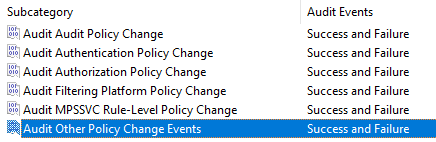
Activer les audits de changements de politiques '<span style="color: rgb(132,63,161);">***Policy change***</span>':

<table id="bkmrk-tout-passer-en-%27succ-4" style="border-collapse: collapse; width: 100%; height: 160.25px;"><colgroup><col style="width: 50%;"></col><col style="width: 50%;"></col></colgroup><tbody><tr style="height: 160.25px;"><td class="align-center" style="border-style: hidden; vertical-align: middle; height: 160.25px;">Tout Passer en 'success &amp; failure'  
</td><td class="align-center" style="border-style: hidden; vertical-align: middle; height: 160.25px;">[![image.png](https://docs.labs404.fr/uploads/images/gallery/2026-07/scaled-1680-/eREimage-png.png)](https://docs.labs404.fr/uploads/images/gallery/2026-07/scaled-1680-/eREimage-png.png)

</td></tr></tbody></table>

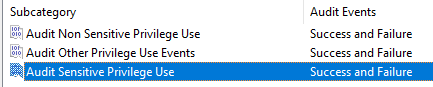
Activer les audits d'utilisation de privilèges '<span style="color: rgb(132,63,161);">***Privilege use***</span>':

<table id="bkmrk-tout-passer-en-%27succ-5" style="border-collapse: collapse; width: 100%; height: 160.25px;"><colgroup><col style="width: 50%;"></col><col style="width: 50%;"></col></colgroup><tbody><tr style="height: 160.25px;"><td class="align-center" style="border-style: hidden; vertical-align: middle; height: 160.25px;">Tout Passer en 'success &amp; failure'  
</td><td class="align-center" style="border-style: hidden; vertical-align: middle; height: 160.25px;">[![image.png](https://docs.labs404.fr/uploads/images/gallery/2026-07/scaled-1680-/wP7image-png.png)](https://docs.labs404.fr/uploads/images/gallery/2026-07/scaled-1680-/wP7image-png.png)

</td></tr></tbody></table>

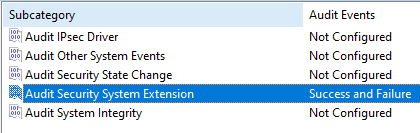
Activer les audits systèmes '<span style="color: rgb(132,63,161);">***System***</span>':

<table id="bkmrk-a-minima-%3A-audit-sec" style="border-collapse: collapse; width: 100%; height: 160.25px;"><colgroup><col style="width: 50%;"></col><col style="width: 50%;"></col></colgroup><tbody><tr style="height: 160.25px;"><td class="align-center" style="border-style: hidden; vertical-align: middle; height: 160.25px;">A minima :

- Audit Security System Extention

</td><td class="align-center" style="border-style: hidden; vertical-align: middle; height: 160.25px;">[![image.png](https://docs.labs404.fr/uploads/images/gallery/2026-07/scaled-1680-/k0Dimage-png.png)](https://docs.labs404.fr/uploads/images/gallery/2026-07/scaled-1680-/k0Dimage-png.png)

</td></tr></tbody></table>


#### *<span style="color: rgb(35,111,161);">**5.2 Activer le 'Path Hardening' sur le netlogon et le sysvol**</span>* 

Lancer l’éditeur de GPO :

[![image.png](https://docs.labs404.fr/uploads/images/gallery/2026-07/scaled-1680-/gAtimage-png.png)](https://docs.labs404.fr/uploads/images/gallery/2026-07/scaled-1680-/gAtimage-png.png)

Créer une GPO et la placer sur chaque OU contenant des Ordinateurs.

faire '<span style="color: rgb(132,63,161);">***Clic droit --&gt; Edit***</span>'

[![image.png](https://docs.labs404.fr/uploads/images/gallery/2026-07/scaled-1680-/bn5image-png.png)](https://docs.labs404.fr/uploads/images/gallery/2026-07/scaled-1680-/bn5image-png.png)

Dans la section '<span style="color: rgb(132,63,161);">***Computer Configuration / Policies / Administrative Templates / Network / Network Provider***</span>'

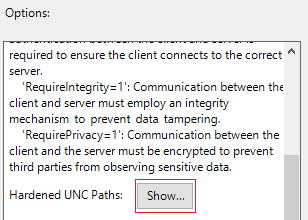
Editer l'option '<span style="color: rgb(132,63,161);">***Hardened UNC Paths***</span>'

[![image.png](https://docs.labs404.fr/uploads/images/gallery/2026-07/scaled-1680-/TDfimage-png.png)](https://docs.labs404.fr/uploads/images/gallery/2026-07/scaled-1680-/TDfimage-png.png)

Activer le paramétrage en cochant '<span style="color: rgb(132,63,161);">***Enabled***</span>'

Puis cliquer sur '<span style="color: rgb(132,63,161);">***Show***</span>'

[![image.png](https://docs.labs404.fr/uploads/images/gallery/2026-07/scaled-1680-/qO2image-png.png)](https://docs.labs404.fr/uploads/images/gallery/2026-07/scaled-1680-/qO2image-png.png)

Ajouter les valeurs suivantes

[![image.png](https://docs.labs404.fr/uploads/images/gallery/2026-07/scaled-1680-/yL3image-png.png)](https://docs.labs404.fr/uploads/images/gallery/2026-07/scaled-1680-/yL3image-png.png)

##### *<span style="color: rgb(53,152,219);">5.4.3 Ajouter une redondance de contrôleur de domaine.</span>* 

<p class="callout info">**Note** : Voir la page [Active directory - Ajout d'un DC](https://docs.labs404.fr/books/roles-services/page/active-directory-ajout-dun-dc "Active directory - Ajout d'un DC")</p>

---

### <span style="text-decoration: underline; color: rgb(52,73,94);">**VI. Conclusion**</span>

[![image.png](https://docs.labs404.fr/uploads/images/gallery/2026-07/scaled-1680-/0dvimage-png.png)](https://docs.labs404.fr/uploads/images/gallery/2026-07/scaled-1680-/0dvimage-png.png)

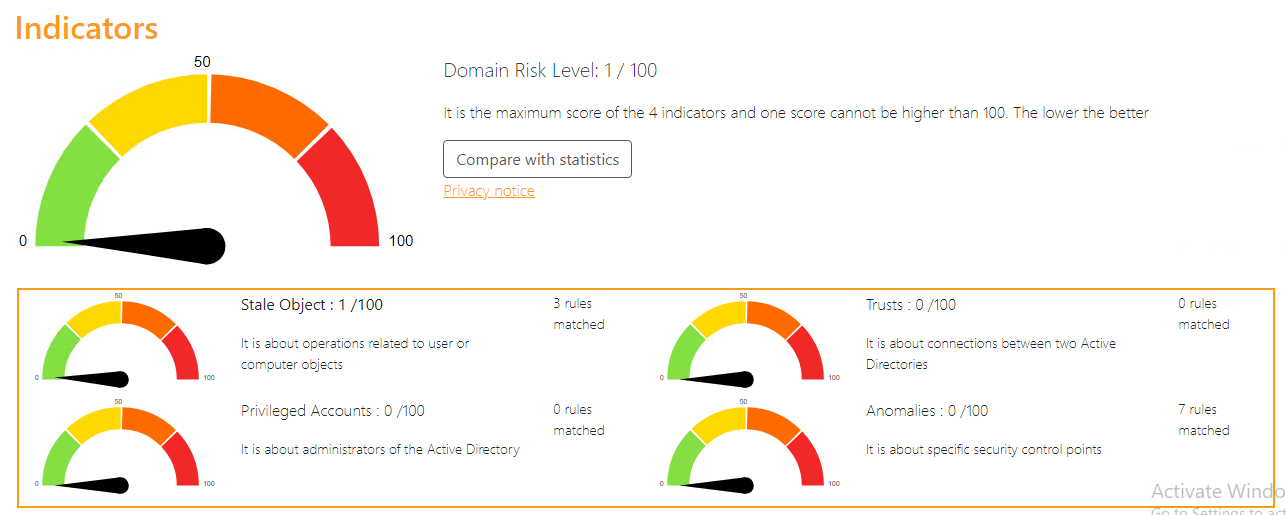
Le point restant est dû à un compte dont le mot de passe n'expire pas. Celui-ci sera révisé pour être éliminé et remplacé par un compte GMSA.

Il peut toujours être utile de correiger les eventuels points soulevés ultérieurement par l'audit, même si ceux-ci ne coûtent pas de points.