# MAC - Installation de MACOS

<table id="bkmrk-difficult%C3%A9%2A-%3Cdescrip" style="border-collapse: collapse; width: 100%; height: 46.8px; border-width: 1px; border-style: hidden;"><colgroup><col style="width: 20%;"></col><col style="width: 80%;"></col></colgroup><tbody><tr style="height: 46.8px;"><td style="height: 46.8px; border: 1px groove rgb(52,73,94);">[![Débutant.png](https://docs.labs404.fr/uploads/images/gallery/2026-07/scaled-1680-/3hpdebutant-png.png)](https://docs.labs404.fr/uploads/images/gallery/2026-07/scaled-1680-/3hpdebutant-png.png)</td><td style="height: 46.8px; border-width: 1px; background-color: rgb(236,202,250); vertical-align: top;">Difficulté : Débutant

Notions : Installation système, mac OS.

</td></tr></tbody></table>

---

### <span style="color: rgb(52, 73, 94);">**<span style="text-decoration: underline;">I. Introduction</span>**</span>

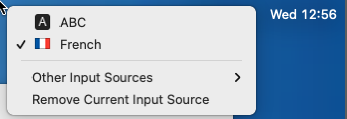
<p class="callout success">**<span style="color: rgb(23,43,77); font-family: '-apple-system', BlinkMacSystemFont, 'Segoe UI', Roboto, Oxygen, Ubuntu, 'Fira Sans', 'Droid Sans', 'Helvetica Neue', sans-serif; font-size: 16px; font-style: normal; font-weight: 400; letter-spacing: -0.08px; text-indent: 0px; text-transform: none; white-space: pre-wrap; word-spacing: 0px; text-decoration-thickness: initial; text-decoration-style: initial; text-decoration-color: initial; display: inline; float: none;">Si le layout clavier pose problème, il est possible de le changer en cliquant sur le petit clavier en haut à droite et sélectionner “French”.</span>**</p>

[![image.png](https://docs.labs404.fr/uploads/images/gallery/2026-07/scaled-1680-/KJcimage-png.png)](https://docs.labs404.fr/uploads/images/gallery/2026-07/scaled-1680-/KJcimage-png.png)

---

### **<span style="text-decoration: underline;"><span style="color: rgb(52, 73, 94); text-decoration: underline;">II. Processus d'installation</span>  
</span>**

<table id="bkmrk-s%C3%A9lectionner-france-" style="border-collapse: collapse; width: 100%; height: 1041.6px;"><colgroup><col style="width: 50.0618%;"></col><col style="width: 50.0618%;"></col></colgroup><tbody><tr style="height: 312.133px;"><td style="height: 312.133px; border-style: hidden;">[![image.png](https://docs.labs404.fr/uploads/images/gallery/2026-07/scaled-1680-/kFAimage-png.png)](https://docs.labs404.fr/uploads/images/gallery/2026-07/scaled-1680-/kFAimage-png.png)

</td><td style="height: 312.133px; border-style: hidden;">[![image.png](https://docs.labs404.fr/uploads/images/gallery/2026-07/scaled-1680-/pgoimage-png.png)](https://docs.labs404.fr/uploads/images/gallery/2026-07/scaled-1680-/pgoimage-png.png)

</td></tr><tr style="height: 32.2px;"><td class="align-center" style="height: 32.2px; border-style: hidden;">*Sélectionner France et poursuivre.*</td><td class="align-center" style="height: 32.2px; border-style: hidden;">*Cliquer sur “***<span class="fabric-text-color-mark">continue</span>***”.*</td></tr><tr style="height: 315.167px;"><td style="height: 315.167px; border-style: hidden;">[![image.png](https://docs.labs404.fr/uploads/images/gallery/2026-07/scaled-1680-/UoOimage-png.png)](https://docs.labs404.fr/uploads/images/gallery/2026-07/scaled-1680-/UoOimage-png.png)

</td><td style="height: 315.167px; border-style: hidden;">[![image.png](https://docs.labs404.fr/uploads/images/gallery/2026-07/scaled-1680-/Cjnimage-png.png)](https://docs.labs404.fr/uploads/images/gallery/2026-07/scaled-1680-/Cjnimage-png.png)

</td></tr><tr style="height: 32.2px;"><td class="align-center" style="height: 32.2px; border-style: hidden;">*Cliquer sur “**<span class="fabric-text-color-mark">Not Now</span>**”.*</td><td class="align-center" style="height: 32.2px; border-style: hidden;">*Cliquer sur “**<span class="fabric-text-color-mark">Continue</span>**”.*</td></tr><tr style="height: 314.5px;"><td style="height: 314.5px; border-style: hidden;">[![image.png](https://docs.labs404.fr/uploads/images/gallery/2026-07/scaled-1680-/QgWimage-png.png)](https://docs.labs404.fr/uploads/images/gallery/2026-07/scaled-1680-/QgWimage-png.png)

</td><td style="height: 314.5px; border-style: hidden;">[![image.png](https://docs.labs404.fr/uploads/images/gallery/2026-07/scaled-1680-/aFXimage-png.png)](https://docs.labs404.fr/uploads/images/gallery/2026-07/scaled-1680-/aFXimage-png.png)

</td></tr><tr style="height: 35.4px;"><td class="align-center" style="height: 35.4px; border-style: hidden;">*Cliquer sur “**<span class="fabric-text-color-mark">Not Now</span>**”.*

</td><td class="align-center" style="height: 35.4px; border-style: hidden;">*Cliquer sur “**<span class="fabric-text-color-mark">Set Up Later</span>**”.*

</td></tr></tbody></table>

<span style="color: rgb(23,43,77); font-family: '-apple-system', BlinkMacSystemFont, 'Segoe UI', Roboto, Oxygen, Ubuntu, 'Fira Sans', 'Droid Sans', 'Helvetica Neue', sans-serif; font-size: 16px; font-style: normal; font-weight: 400; letter-spacing: -0.08px; text-indent: 0px; text-transform: none; white-space: pre-wrap; word-spacing: 0px; background-color: rgb(255,255,255); text-decoration-thickness: initial; text-decoration-style: initial; text-decoration-color: initial; display: inline; float: none;">Cliquer sur “</span>***<span class="fabric-text-color-mark">Skip</span>***<span style="color: rgb(23,43,77); font-family: '-apple-system', BlinkMacSystemFont, 'Segoe UI', Roboto, Oxygen, Ubuntu, 'Fira Sans', 'Droid Sans', 'Helvetica Neue', sans-serif; font-size: 16px; font-style: normal; font-weight: 400; letter-spacing: -0.08px; text-indent: 0px; text-transform: none; white-space: pre-wrap; word-spacing: 0px; background-color: rgb(255,255,255); text-decoration-thickness: initial; text-decoration-style: initial; text-decoration-color: initial; display: inline; float: none;">”.</span>

[![image.png](https://docs.labs404.fr/uploads/images/gallery/2026-07/scaled-1680-/RwFimage-png.png)](https://docs.labs404.fr/uploads/images/gallery/2026-07/scaled-1680-/RwFimage-png.png)

<span style="color: rgb(23,43,77); font-family: '-apple-system', BlinkMacSystemFont, 'Segoe UI', Roboto, Oxygen, Ubuntu, 'Fira Sans', 'Droid Sans', 'Helvetica Neue', sans-serif; font-size: 16px; font-style: normal; font-weight: 400; letter-spacing: -0.08px; text-indent: 0px; text-transform: none; white-space: pre-wrap; word-spacing: 0px; background-color: rgb(255,255,255); text-decoration-thickness: initial; text-decoration-style: initial; text-decoration-color: initial; display: inline; float: none;">Accepter les conditions générales; Cliquer sur “</span>***<span class="fabric-text-color-mark">Agree</span>***<span style="color: rgb(23,43,77); font-family: '-apple-system', BlinkMacSystemFont, 'Segoe UI', Roboto, Oxygen, Ubuntu, 'Fira Sans', 'Droid Sans', 'Helvetica Neue', sans-serif; font-size: 16px; font-style: normal; font-weight: 400; letter-spacing: -0.08px; text-indent: 0px; text-transform: none; white-space: pre-wrap; word-spacing: 0px; background-color: rgb(255,255,255); text-decoration-thickness: initial; text-decoration-style: initial; text-decoration-color: initial; display: inline; float: none;">”.</span>

[![image.png](https://docs.labs404.fr/uploads/images/gallery/2026-07/scaled-1680-/mXGimage-png.png)](https://docs.labs404.fr/uploads/images/gallery/2026-07/scaled-1680-/mXGimage-png.png)

<span style="color: rgb(23,43,77); font-family: '-apple-system', BlinkMacSystemFont, 'Segoe UI', Roboto, Oxygen, Ubuntu, 'Fira Sans', 'Droid Sans', 'Helvetica Neue', sans-serif; font-size: 16px; font-style: normal; font-weight: 400; letter-spacing: -0.08px; text-indent: 0px; text-transform: none; white-space: pre-wrap; word-spacing: 0px; background-color: rgb(255,255,255); text-decoration-thickness: initial; text-decoration-style: initial; text-decoration-color: initial; display: inline; float: none;">Confirmer en cliquant de nouveau sur “</span>***<span class="fabric-text-color-mark">Agree</span>***<span style="color: rgb(23,43,77); font-family: '-apple-system', BlinkMacSystemFont, 'Segoe UI', Roboto, Oxygen, Ubuntu, 'Fira Sans', 'Droid Sans', 'Helvetica Neue', sans-serif; font-size: 16px; font-style: normal; font-weight: 400; letter-spacing: -0.08px; text-indent: 0px; text-transform: none; white-space: pre-wrap; word-spacing: 0px; background-color: rgb(255,255,255); text-decoration-thickness: initial; text-decoration-style: initial; text-decoration-color: initial; display: inline; float: none;">”.</span>

[![image.png](https://docs.labs404.fr/uploads/images/gallery/2026-07/scaled-1680-/HnXimage-png.png)](https://docs.labs404.fr/uploads/images/gallery/2026-07/scaled-1680-/HnXimage-png.png)

<span style="color: rgb(23,43,77); font-family: '-apple-system', BlinkMacSystemFont, 'Segoe UI', Roboto, Oxygen, Ubuntu, 'Fira Sans', 'Droid Sans', 'Helvetica Neue', sans-serif; font-size: 16px; font-style: normal; font-weight: 400; letter-spacing: -0.08px; text-indent: 0px; text-transform: none; white-space: pre-wrap; word-spacing: 0px; background-color: rgb(255,255,255); text-decoration-thickness: initial; text-decoration-style: initial; text-decoration-color: initial; display: inline; float: none;">Entrer les informations d’identification puis cliquer sur “</span>***<span class="fabric-text-color-mark">Continue</span>***<span style="color: rgb(23,43,77); font-family: '-apple-system', BlinkMacSystemFont, 'Segoe UI', Roboto, Oxygen, Ubuntu, 'Fira Sans', 'Droid Sans', 'Helvetica Neue', sans-serif; font-size: 16px; font-style: normal; font-weight: 400; letter-spacing: -0.08px; text-indent: 0px; text-transform: none; white-space: pre-wrap; word-spacing: 0px; background-color: rgb(255,255,255); text-decoration-thickness: initial; text-decoration-style: initial; text-decoration-color: initial; display: inline; float: none;">”.</span>

[![image.png](https://docs.labs404.fr/uploads/images/gallery/2026-07/scaled-1680-/xPvimage-png.png)](https://docs.labs404.fr/uploads/images/gallery/2026-07/scaled-1680-/xPvimage-png.png)

<span style="color: rgb(23,43,77); font-family: '-apple-system', BlinkMacSystemFont, 'Segoe UI', Roboto, Oxygen, Ubuntu, 'Fira Sans', 'Droid Sans', 'Helvetica Neue', sans-serif; font-size: 16px; font-style: normal; font-weight: 400; letter-spacing: -0.08px; text-indent: 0px; text-transform: none; white-space: pre-wrap; word-spacing: 0px; background-color: rgb(255,255,255); text-decoration-thickness: initial; text-decoration-style: initial; text-decoration-color: initial; display: inline; float: none;">Cliquer sur “</span>***<span class="fabric-text-color-mark">Customize Settings</span>***<span style="color: rgb(23,43,77); font-family: '-apple-system', BlinkMacSystemFont, 'Segoe UI', Roboto, Oxygen, Ubuntu, 'Fira Sans', 'Droid Sans', 'Helvetica Neue', sans-serif; font-size: 16px; font-style: normal; font-weight: 400; letter-spacing: -0.08px; text-indent: 0px; text-transform: none; white-space: pre-wrap; word-spacing: 0px; background-color: rgb(255,255,255); text-decoration-thickness: initial; text-decoration-style: initial; text-decoration-color: initial; display: inline; float: none;">”.</span>

[![image.png](https://docs.labs404.fr/uploads/images/gallery/2026-07/scaled-1680-/iMWimage-png.png)](https://docs.labs404.fr/uploads/images/gallery/2026-07/scaled-1680-/iMWimage-png.png)

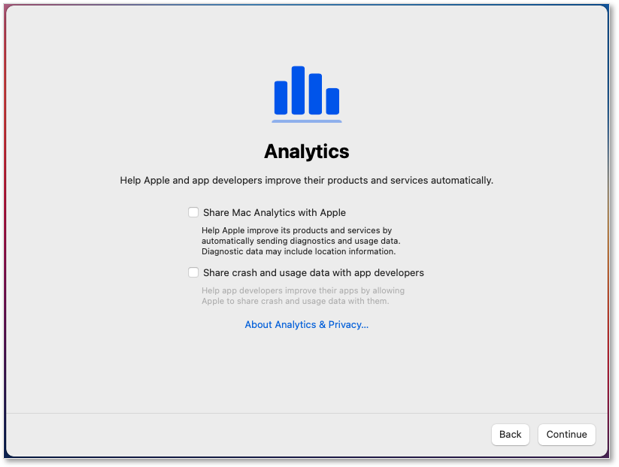
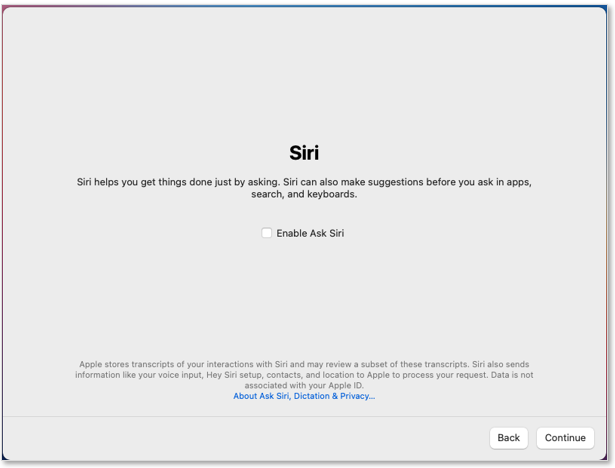
Laisser toutes les cases décochées et cliquer sur “***<span class="fabric-text-color-mark">Continue</span>***” jusqu’a la fin du paramétrage.

Confirmer a chaque fois en cliquant sur “***<span class="fabric-text-color-mark">Don’t Use</span>***”.

<table id="bkmrk--7" style="border-collapse: collapse; width: 100%;"><colgroup><col style="width: 50%;"></col><col style="width: 50%;"></col></colgroup><tbody><tr><td style="border-style: hidden;">[![image.png](https://docs.labs404.fr/uploads/images/gallery/2026-07/scaled-1680-/HFaimage-png.png)](https://docs.labs404.fr/uploads/images/gallery/2026-07/scaled-1680-/HFaimage-png.png)

</td><td style="border-style: hidden;">[![image.png](https://docs.labs404.fr/uploads/images/gallery/2026-07/scaled-1680-/REnimage-png.png)](https://docs.labs404.fr/uploads/images/gallery/2026-07/scaled-1680-/REnimage-png.png)

</td></tr></tbody></table>

<span style="color: rgb(23,43,77); font-family: '-apple-system', BlinkMacSystemFont, 'Segoe UI', Roboto, Oxygen, Ubuntu, 'Fira Sans', 'Droid Sans', 'Helvetica Neue', sans-serif; font-size: 16px; font-style: normal; font-weight: 400; letter-spacing: -0.08px; text-indent: 0px; text-transform: none; white-space: pre-wrap; word-spacing: 0px; background-color: rgb(255,255,255); text-decoration-thickness: initial; text-decoration-style: initial; text-decoration-color: initial; display: inline; float: none;">Choisir le fuseau horaire puis cliquer sur “</span>***<span class="fabric-text-color-mark">Continue</span>***<span style="color: rgb(23,43,77); font-family: '-apple-system', BlinkMacSystemFont, 'Segoe UI', Roboto, Oxygen, Ubuntu, 'Fira Sans', 'Droid Sans', 'Helvetica Neue', sans-serif; font-size: 16px; font-style: normal; font-weight: 400; letter-spacing: -0.08px; text-indent: 0px; text-transform: none; white-space: pre-wrap; word-spacing: 0px; background-color: rgb(255,255,255); text-decoration-thickness: initial; text-decoration-style: initial; text-decoration-color: initial; display: inline; float: none;">”.</span>

[![image.png](https://docs.labs404.fr/uploads/images/gallery/2026-07/scaled-1680-/9F6image-png.png)](https://docs.labs404.fr/uploads/images/gallery/2026-07/scaled-1680-/9F6image-png.png)

**Décocher**<span style="color: rgb(23,43,77); font-family: '-apple-system', BlinkMacSystemFont, 'Segoe UI', Roboto, Oxygen, Ubuntu, 'Fira Sans', 'Droid Sans', 'Helvetica Neue', sans-serif; font-size: 16px; font-style: normal; font-weight: 400; letter-spacing: -0.08px; text-indent: 0px; text-transform: none; white-space: pre-wrap; word-spacing: 0px; background-color: rgb(255,255,255); text-decoration-thickness: initial; text-decoration-style: initial; text-decoration-color: initial; display: inline; float: none;"> les deux cases suivantes puis cliquer sur “</span>***<span class="fabric-text-color-mark">Continue</span>***<span style="color: rgb(23,43,77); font-family: '-apple-system', BlinkMacSystemFont, 'Segoe UI', Roboto, Oxygen, Ubuntu, 'Fira Sans', 'Droid Sans', 'Helvetica Neue', sans-serif; font-size: 16px; font-style: normal; font-weight: 400; letter-spacing: -0.08px; text-indent: 0px; text-transform: none; white-space: pre-wrap; word-spacing: 0px; background-color: rgb(255,255,255); text-decoration-thickness: initial; text-decoration-style: initial; text-decoration-color: initial; display: inline; float: none;">”.</span>

<table id="bkmrk--9" style="border-collapse: collapse; width: 100%;"><colgroup><col style="width: 50%;"></col><col style="width: 50%;"></col></colgroup><tbody><tr><td>[![image.png](https://docs.labs404.fr/uploads/images/gallery/2026-07/scaled-1680-/628image-png.png)](https://docs.labs404.fr/uploads/images/gallery/2026-07/scaled-1680-/628image-png.png)

</td><td>[![image.png](https://docs.labs404.fr/uploads/images/gallery/2026-07/scaled-1680-/KYSimage-png.png)](https://docs.labs404.fr/uploads/images/gallery/2026-07/scaled-1680-/KYSimage-png.png)

</td></tr></tbody></table>

<span style="color: rgb(23,43,77); font-family: '-apple-system', BlinkMacSystemFont, 'Segoe UI', Roboto, Oxygen, Ubuntu, 'Fira Sans', 'Droid Sans', 'Helvetica Neue', sans-serif; font-size: 16px; font-style: normal; font-weight: 400; letter-spacing: -0.08px; text-indent: 0px; text-transform: none; white-space: pre-wrap; word-spacing: 0px; background-color: rgb(255,255,255); text-decoration-thickness: initial; text-decoration-style: initial; text-decoration-color: initial; display: inline; float: none;">Sélectionner le thème. Cliquer sur “</span>***<span class="fabric-text-color-mark">Continue</span>***<span style="color: rgb(23,43,77); font-family: '-apple-system', BlinkMacSystemFont, 'Segoe UI', Roboto, Oxygen, Ubuntu, 'Fira Sans', 'Droid Sans', 'Helvetica Neue', sans-serif; font-size: 16px; font-style: normal; font-weight: 400; letter-spacing: -0.08px; text-indent: 0px; text-transform: none; white-space: pre-wrap; word-spacing: 0px; background-color: rgb(255,255,255); text-decoration-thickness: initial; text-decoration-style: initial; text-decoration-color: initial; display: inline; float: none;">”.</span>

[![image.png](https://docs.labs404.fr/uploads/images/gallery/2026-07/scaled-1680-/L7rimage-png.png)](https://docs.labs404.fr/uploads/images/gallery/2026-07/scaled-1680-/L7rimage-png.png)

<span style="color: rgb(23,43,77); font-family: '-apple-system', BlinkMacSystemFont, 'Segoe UI', Roboto, Oxygen, Ubuntu, 'Fira Sans', 'Droid Sans', 'Helvetica Neue', sans-serif; font-size: 16px; font-style: normal; font-weight: 400; letter-spacing: -0.08px; text-indent: 0px; text-transform: none; white-space: pre-wrap; word-spacing: 0px; background-color: rgb(255,255,255); text-decoration-thickness: initial; text-decoration-style: initial; text-decoration-color: initial; display: inline; float: none;">L’installation est terminée.</span>

[![image.png](https://docs.labs404.fr/uploads/images/gallery/2026-07/scaled-1680-/Qdsimage-png.png)](https://docs.labs404.fr/uploads/images/gallery/2026-07/scaled-1680-/Qdsimage-png.png)

<p class="callout success">Si installé sur une VM, continuer avec : [MAC - Installer les VMware Tools](https://docs.labs404.fr/books/systemes/page/mac-installer-les-vmware-tools "MAC - Installer les VMware Tools")</p>