# Windows - Installer un serveur KMS 'Tipiak'

<table id="bkmrk-difficult%C3%A9%2A-%3Cdescrip" style="border-collapse: collapse; width: 100%; height: 46.8px; border-width: 1px; border-style: hidden;"><colgroup><col style="width: 20%;"></col><col style="width: 80%;"></col></colgroup><tbody><tr style="height: 46.8px;"><td style="height: 46.8px; border: 1px groove rgb(52,73,94);">[![intermédiaire.png](https://docs.labs404.fr/uploads/images/gallery/2026-07/scaled-1680-/qRWintermediaire-png.png)](https://docs.labs404.fr/uploads/images/gallery/2026-07/scaled-1680-/qRWintermediaire-png.png)</td><td style="height: 46.8px; border-width: 1px; background-color: rgb(236,202,250); vertical-align: top;">Difficulté : Intermédiaire

Notions : Windows, activation, licensing, tipiak.

</td></tr></tbody></table>

---

### <span style="color: rgb(52, 73, 94);">**<span style="text-decoration: underline;">I. Introduction</span>**</span>

<p class="callout danger">**Alerte de sécurité** : Cette méthode représente une faille majeure de sécurité pour les deux raisons suivantes : Le fait de télécharger des 'cracks' ou autres modifications contraires au CGU et parfois même à la loi peut entraîner des poursuites. De plus, il s'agit de faire confiance à une personne inconnues ou un groupe inconnu sans être certain de leurs motivations exactes.</p>

**<span style="color: rgb(23,43,77); font-family: '-apple-system', BlinkMacSystemFont, 'Segoe UI', Roboto, Oxygen, Ubuntu, 'Fira Sans', 'Droid Sans', 'Helvetica Neue', sans-serif; font-size: 16px; font-style: normal; font-weight: 400; letter-spacing: -0.08px; text-indent: 0px; text-transform: none; white-space: pre-wrap; word-spacing: 0px; background-color: rgb(255,255,255); text-decoration-thickness: initial; text-decoration-style: initial; text-decoration-color: initial; display: inline; float: none;">Pour du lab sur une longue durée, les période d'évaluation peuvent ne pas suffire. Il faut donc procéder à l’activation des Windows. Mais cela coûte cher. Il existe cependant un moyen de ‘changer’ ça.</span>**

<p class="callout danger">**<span style="font-family: '-apple-system', BlinkMacSystemFont, 'Segoe UI', Roboto, Oxygen, Ubuntu, 'Fira Sans', 'Droid Sans', 'Helvetica Neue', sans-serif; font-size: 16px; font-style: normal; font-weight: 400; letter-spacing: -0.08px; text-indent: 0px; text-transform: none; white-space: pre-wrap; word-spacing: 0px; text-decoration-thickness: initial; text-decoration-style: initial; text-decoration-color: initial; display: inline; float: none;">**Prérequis** : Un serveur DNS fonctionnel.</span>**</p>

---

### **<span style="text-decoration: underline;"><span style="color: rgb(52, 73, 94); text-decoration: underline;">II. Mise en place</span>  
</span>**

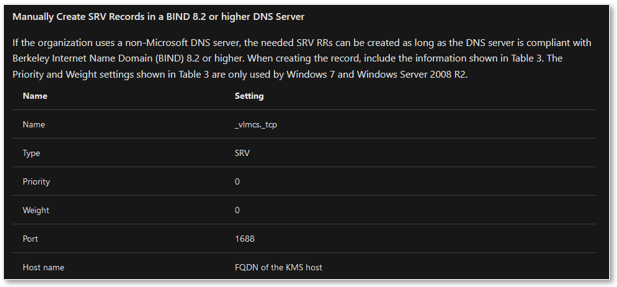
#### <span style="color: rgb(35, 111, 161);">**2.1 Création de l'enregistrement DNS**</span>  


<span style="color: rgb(23,43,77); font-family: '-apple-system', BlinkMacSystemFont, 'Segoe UI', Roboto, Oxygen, Ubuntu, 'Fira Sans', 'Droid Sans', 'Helvetica Neue', sans-serif; font-size: 16px; font-style: normal; font-weight: 400; letter-spacing: -0.08px; text-indent: 0px; text-transform: none; white-space: pre-wrap; word-spacing: 0px; background-color: rgb(255,255,255); text-decoration-thickness: initial; text-decoration-style: initial; text-decoration-color: initial; display: inline; float: none;">Créer l'enregistrement DNS du serveur KMS. Comme pour un vrai serveur.</span>

[![image.png](https://docs.labs404.fr/uploads/images/gallery/2026-07/scaled-1680-/YT7image-png.png)](https://docs.labs404.fr/uploads/images/gallery/2026-07/scaled-1680-/YT7image-png.png)

####   


#### <span style="color: rgb(35, 111, 161);">**2.2 Installer le service**</span>

Dézipper l’installer (non fourni <span class="emoji-common-main-styles emoji-common-node emoji-common-emoji-image css-1np3glt" style="background-color: transparent; display: inline-block; vertical-align: middle; margin: -1px 0px;" title=":wink:">![:wink:](https://pf-emoji-service--cdn.us-east-1.prod.public.atl-paas.net/standard/caa27a19-fc09-4452-b2b4-a301552fd69c/64x64/1f609.png)</span>).

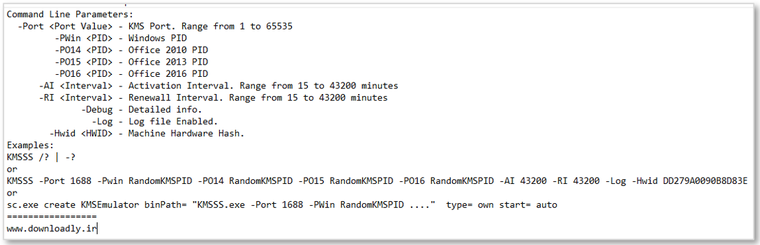
Voici le fichier d’aide des commandes :

[![image.png](https://docs.labs404.fr/uploads/images/gallery/2026-07/scaled-1680-/nNEimage-png.png)](https://docs.labs404.fr/uploads/images/gallery/2026-07/scaled-1680-/nNEimage-png.png)
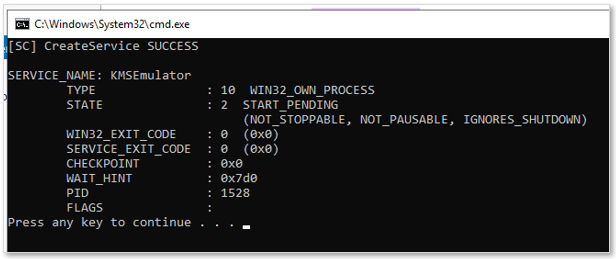
<span style="color: rgb(23,43,77); font-family: '-apple-system', BlinkMacSystemFont, 'Segoe UI', Roboto, Oxygen, Ubuntu, 'Fira Sans', 'Droid Sans', 'Helvetica Neue', sans-serif; font-size: 16px; font-style: normal; font-weight: 400; letter-spacing: -0.08px; text-indent: 0px; text-transform: none; white-space: pre-wrap; word-spacing: 0px; background-color: rgb(255,255,255); text-decoration-thickness: initial; text-decoration-style: initial; text-decoration-color: initial; display: inline; float: none;">Lancer donc le script d’installation du service KMS ‘</span>***<span class="fabric-text-color-mark">InstallKMS</span>***<span style="color: rgb(23,43,77); font-family: '-apple-system', BlinkMacSystemFont, 'Segoe UI', Roboto, Oxygen, Ubuntu, 'Fira Sans', 'Droid Sans', 'Helvetica Neue', sans-serif; font-size: 16px; font-style: normal; font-weight: 400; letter-spacing: -0.08px; text-indent: 0px; text-transform: none; white-space: pre-wrap; word-spacing: 0px; background-color: rgb(255,255,255); text-decoration-thickness: initial; text-decoration-style: initial; text-decoration-color: initial; display: inline; float: none;">’.</span>

[![image.png](https://docs.labs404.fr/uploads/images/gallery/2026-07/scaled-1680-/8omimage-png.png)](https://docs.labs404.fr/uploads/images/gallery/2026-07/scaled-1680-/8omimage-png.png)

#### <span style="color: rgb(35, 111, 161);">**2.3 Activer les clients**</span>

<span style="color: rgb(23,43,77); font-family: '-apple-system', BlinkMacSystemFont, 'Segoe UI', Roboto, Oxygen, Ubuntu, 'Fira Sans', 'Droid Sans', 'Helvetica Neue', sans-serif; font-size: 16px; font-style: normal; font-weight: 400; letter-spacing: -0.08px; text-indent: 0px; text-transform: none; white-space: pre-wrap; word-spacing: 0px; background-color: rgb(255,255,255); text-decoration-thickness: initial; text-decoration-style: initial; text-decoration-color: initial; display: inline; float: none;">Puis le script ‘<span style="color: rgb(132,63,161);">***StartKMS***</span>’.</span>

<span style="color: rgb(23,43,77); font-family: '-apple-system', BlinkMacSystemFont, 'Segoe UI', Roboto, Oxygen, Ubuntu, 'Fira Sans', 'Droid Sans', 'Helvetica Neue', sans-serif; font-size: 16px; font-style: normal; font-weight: 400; letter-spacing: -0.08px; text-indent: 0px; text-transform: none; white-space: pre-wrap; word-spacing: 0px; background-color: rgb(255,255,255); text-decoration-thickness: initial; text-decoration-style: initial; text-decoration-color: initial; display: inline; float: none;"><span style="color: rgb(23,43,77); font-family: '-apple-system', BlinkMacSystemFont, 'Segoe UI', Roboto, Oxygen, Ubuntu, 'Fira Sans', 'Droid Sans', 'Helvetica Neue', sans-serif; font-size: 16px; font-style: normal; font-weight: 400; letter-spacing: -0.08px; text-indent: 0px; text-transform: none; white-space: pre-wrap; word-spacing: 0px; background-color: rgb(255,255,255); text-decoration-thickness: initial; text-decoration-style: initial; text-decoration-color: initial; display: inline; float: none;">Sur les clients, utiliser les commandes standards : </span></span>

```
slmgr /ipk <clé KMS>
slmgr /ato
```